飞岩 Extension for Chrome
forestton
Screenshots
App details
- Version
- 1.4.2
- Size
- 786.68 KB
- Updated
- January 20, 2018
- Developer
- forestton
- Category
- Extension
SoftPas in:
This product is also available in the following languages:
About 飞岩 Extension for Chrome
FastNet Accelerator: Secure & Reliable Access
Overview
The FastNet Accelerator is designed to enhance network connectivity by enabling users to bypass restricted or inaccessible websites. It functions as a network optimization tool, aiming to maintain uninterrupted access to online resources. The software targets individuals and professionals who require consistent internet performance, particularly in environments with strict network controls or unstable connections.
While the developer did not provide additional background information, the software is positioned as a utility for users facing connectivity challenges. Real-world scenarios include remote workers accessing essential platforms, students engaging with academic resources, or travelers needing reliable access to global content. The tool is intended to be a lightweight solution, with a minimal installation footprint of 12.5 MB, making it suitable for systems with limited storage.
Users can activate the service with a one-day free trial upon registration, offering immediate access to its core functionality. The software supports both Windows and Mac operating systems, indicating broad compatibility across desktop platforms. The primary goal is to ensure network stability and reduce latency when accessing blocked or slow websites.
Key Features & Capabilities
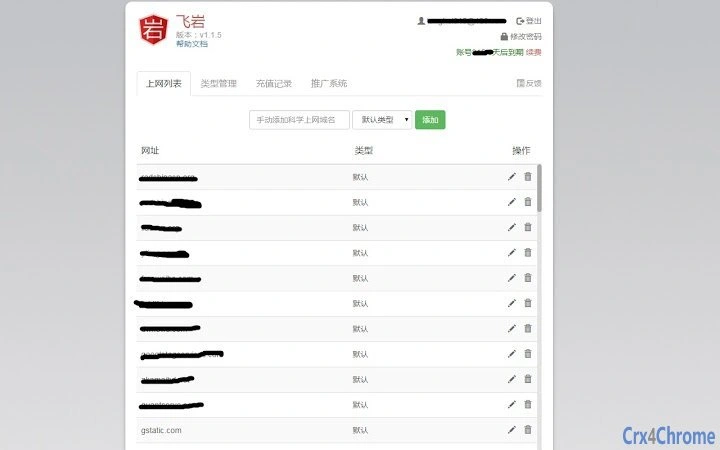
- Website Access Acceleration – Allows users to select specific websites for faster and more stable access, particularly useful when standard connections fail.
- One-Day Free Trial – New users receive a complimentary trial period to test the service’s performance and reliability.
- Multi-Platform Support – Designed to operate on both Windows and Mac systems, ensuring accessibility across major desktop environments.
- Lightweight Installation – With a file size of 12.5 MB, the software is optimized for quick installation and minimal system impact.
- Automatic Network Optimization – Works in the background to detect and adjust network paths for improved performance.
These features are intended to streamline access to restricted content and improve overall browsing efficiency. For example, a user in a region with limited internet freedom could use the tool to access international news portals or educational platforms. Similarly, a professional managing remote projects might rely on it to maintain stable connections to cloud-based collaboration tools.
User Interface, Workflow & Performance
The user interface is designed to be straightforward, with a focus on simplicity and ease of navigation. Users can launch the application and immediately select websites for acceleration through a clean, intuitive dashboard. The workflow is streamlined, requiring minimal input to activate the service.
Navigation within the application appears to be consistent, with clear labeling and logical placement of controls. The software operates in the background after activation, minimizing disruptions to daily tasks. However, exact performance details were not specified, including CPU or RAM usage patterns.
Stability is expected to be consistent, given the lightweight nature of the application and its targeted use case. The developer did not specify resource usage details, so users should monitor system performance during extended use. General software behavior suggests that the tool remains responsive without significant overhead, but real-world performance may vary based on network conditions and device specifications.
Compatibility & System Requirements
FastNet Accelerator is compatible with both Windows and Mac operating systems, making it accessible to a wide range of desktop users. The software version is 1.0.0, with an installation size of 12.5 MB.
Exact system requirements were not listed, so users should ensure their devices meet standard desktop software requirements. The developer did not provide information on minimum hardware specifications, such as processor speed, RAM, or disk space. Compatibility information is limited to the operating systems mentioned.
Users should verify that their system supports the latest updates from Microsoft and Apple to ensure smooth operation. No additional dependencies or third-party tools are required for installation or functionality.
Pros and Cons
Pros
- Offers a one-day free trial for new users
- Supports both Windows and Mac platforms
- Lightweight installation at 12.5 MB
- Designed for quick access to blocked or slow websites
- Simple interface with minimal learning curve
Cons
- Exact system requirements were not provided
- Performance metrics were not disclosed
- Developer background is unknown
- Long-term functionality details are unclear
- No information on update frequency or support channels
FAQ Section
Is FastNet Accelerator compatible with my operating system?
The software is designed to run on both Windows and Mac systems. Specific version compatibility was not detailed in the provided information.
Is the software safe to use?
While the tool is intended to improve network access, users should exercise caution when using third-party network utilities. No security certifications or threat analysis were provided.
How often are updates released?
The frequency of updates was not specified. Users should check the official website for the latest version.
Can I use FastNet Accelerator offline?
The software requires an active internet connection to function, as it relies on network routing and acceleration services.
What does the free trial include?
New users receive one day of full access to the service’s features after registration, allowing them to evaluate its performance.
Final Thoughts + CTA
FastNet Accelerator presents a straightforward solution for users encountering network restrictions or slow access to specific websites. Its lightweight design and cross-platform support make it accessible to a broad audience. The inclusion of a free trial allows users to test its capabilities without commitment.
While detailed technical and system information is limited, the software appears to fulfill its core purpose effectively. It is particularly suited for individuals who need reliable access to blocked or unstable online content. For those seeking a simple, no-cost tool to enhance connectivity, FastNet Accelerator offers a compelling starting point.
Download FastNet Accelerator now
Guides & Tutorials
How to install 飞岩 Extension for Chrome
- Click the Download button above.
- Once redirected, accept the terms and click Install.
- Wait for the 飞岩 Extension for Chrome download to finish on your device.
How to use 飞岩 Extension for Chrome
This software is primarily used for its core features described above. Open the app after installation to explore its capabilities.
User Reviews
No reviews yet. Be the first to share your experience.
You may also like
more
BannedList Highlighter Extension for Chrome
A Chrome extension that automatically highlights entries from John Rentoul's boo...

Bring It Back Extension for Chrome
It is an extension developed to revive the "Discuss" button which disappeared fr...

Clicky for Slack Extension for Chrome
#Clicky for Slack is the fastest and easiest way to share your current tab to an...

wrap Extension for Chrome
Reverting Tumblr’s awful design choices, one at a time. Up to date, despite old...

heriff_v2 Extension for Chrome
Before you install:1. $heriff is not intended for user under the age of 13.2. Fr...

Cards View' Filter for Trello Extension for Chrome
Adds buttons for filtering cards by list in Trello's Cards view.Changelog:1.0 (2...